If you are looking for a fresh resource for skill practice in station rotations, check out Kiddom. Kiddom provides practice in all core areas and pulls from sources such as IXL, Flocabulary, Khan Academy, Newsela, and more. In my sample searches, I liked being able to search the site by skill to locate multiple options for practice rather than searching several sites individually.
Wheel Decide: An alternative to learning menus
Add a little variety to your station rotations in the next couple of weeks by using Wheel Decide. This tool allows your students to select a station by spinning the customizable wheel.
Editing Photos On Your Chromebook
'Tis the season of end-of-year slide shows. Harness the power of your Chromebook to make editing photos easy! Lunapic offers great tools to adjust photos, add borders, filters, special effects, and more.
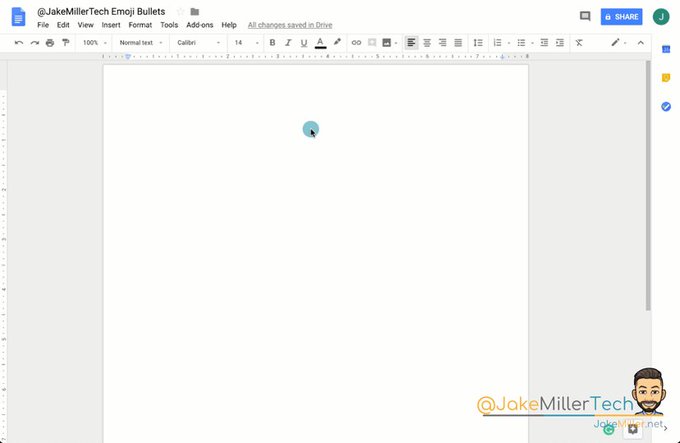
From the Twitter-verse: Emoji Bullets? Yes, Please!
Ok. This post won't transform instruction in your classroom or help you disaggregate data, but it is fun. And at this time of year, I'll take a little bit of fun! #growingingeekiness Check out Jake Miller's tips for making your hyperdoc or lesson plans a little more inviting using emoji bullets. Jake shares more tips and tricks here.
Pear Deckis a web-based application that magnifies the power of Google Slides to improve student engagement, inspire active learning, and facilitate formative assessment. In addition, it offers a pretty cool feature that supports student learning when the class ends. When the teacher ends the Pear Deck session, the interactive slides that the student used during class can be added to the student's Google Drive so the student can access them later for study tools. That takes notetaking to a new level! Pear Deck is a freemium product, which means that some features are accessible for free, while others are accessed only through a subscription. Pear Deck is offering a 3-month promo codethat will take your classes nearly through the end of the year, so now is a perfect time to try it out. Talk to the teachers who attended TCEA. They experienced it first hand throughout the conference, and many have been using it in their classrooms with great success.
Busy Minds are Happy Minds
Looking for activities to engage students' minds when the work is done? Design challenges, extension activities, and reading all fit the bill, but if you're looking for an online activity to allow the students to explore new ideas, check out this Twitter post shared by Dixie Moseley at AES. Offering your students the option to use two or three of these could be a game-changer on computer lab days! And keeping a menu of these in the 1:1 classrooms supports students in making positive choices.
Looking for new ways to manage station rotations? Thanks, Cassie Simon at BMS, for passing this along from the Twitterverse.
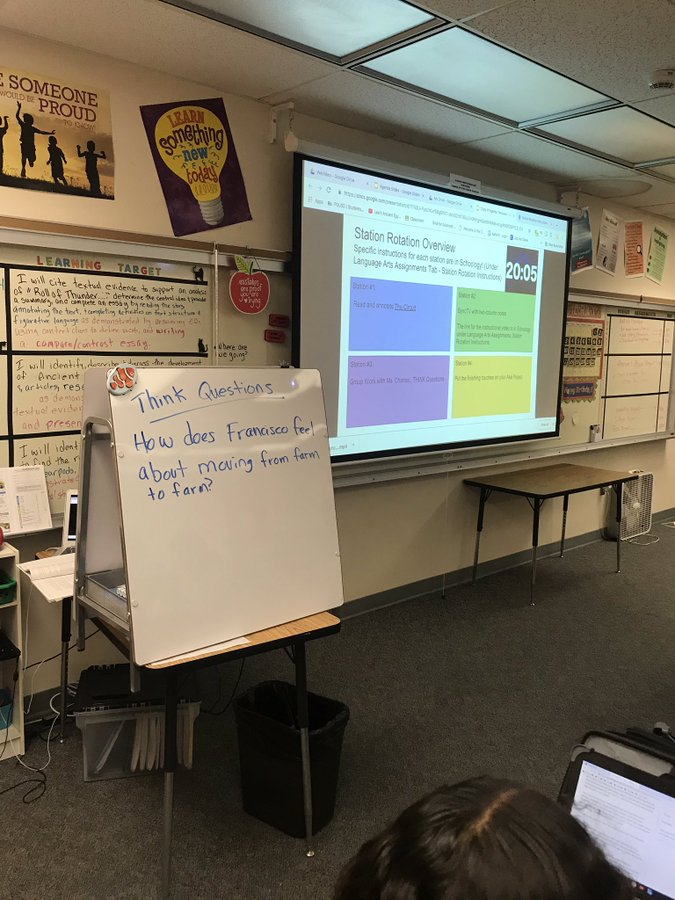
Coaching Tip: If you're designing a station rotation lesson, create an overview using Google Slides & project it so kids can see the different stations. Insert a YouTube video of a timer so students can pace their progress through work #PowerUpBL#BLinActionpic.twitter.com/rHmZIbvn8y
Here is a basic station rotation template I created for my wife who teaches 3rd grade. The template can be easily customized to include more station info or linked resources. I hope someone can use it as a starting point! https://t.co/xlVR1GmDMBpic.twitter.com/rFsENCzDcH
 A Resource for Station Rotations